1
Postka suggests the occasion
Open the app and you immediately see what makes sense in your trade today, with enough lead time to actually prepare an offer, instead of finding out on the day itself.


Social media sits at the bottom of your to-do list and it will probably stay there. Postka accepts that: five to ten minutes, once a month, and you have a batch of posts. You drop it into the queue, and Instagram and Facebook get a post every few days. Without you.
No Postka account to create. 10 posts a month for free. See pricing.

“Sort out social media”: the line that has been moving to tomorrow for six months.
Small businesses do not stop posting because they cannot write. They stop because it is the last item on the list, under the invoices, the orders and the phone that is ringing right now. And the last item on the list never gets done.
So the profile sits still. A customer looks, sees a post from six months ago and leaves, not because the posts were bad, but because there were none. Postka does exactly one thing: makes sure something is there, regularly.

The whole point is never starting from a blank page and not coming back to it every three days. Sit down once, pick a batch, the queue does the rest.
Open the app and you immediately see what makes sense in your trade today, with enough lead time to actually prepare an offer, instead of finding out on the day itself.
Warm, matter-of-fact, playful. Postka knows your business name, your town and what makes you different, so the post sounds like you, not like a leaflet.

You look through the finished captions and graphics, change whatever you like, and Postka spaces them three days apart, or however far apart you set. From there they go out on their own, at the hour you chose. Come back next month.
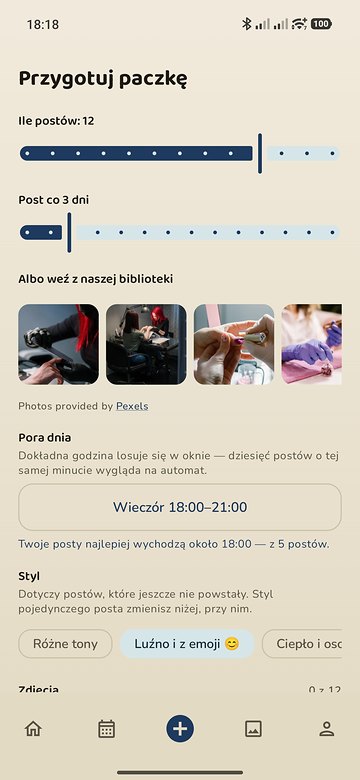
And when no holiday falls that day, Postka still has something. A different post format every day: introduce yourself, show what happens behind the counter, answer a question customers keep asking. You never face an empty field.
The screenshots on this page show the Polish interface, because that is the launch market. The app itself ships in English, Polish, German and Czech.
The hard part was never running out of things to say. It is that at six in the evening you have a client in the chair, not a phone in your hand. You can still send everything by hand, but Postka is built for the way where you do not, at all.
Postka still writes the caption and builds the graphic. You handle sending it yourself, separately for every post in the batch:
You connect once, for free. You choose two channels. Usually Instagram and Facebook, but LinkedIn works just as well instead of Facebook. After that you genuinely come back in a month:
The “five to ten minutes a month, come back in a month” promise assumes Zernio is connected. Without it you still save the time spent writing and designing, but you handle sending it, just like today.
You connect it once and it is done with. Postka walks you through it and shows you a picture of what you will see in somebody else's panel, so you are not hunting for it.
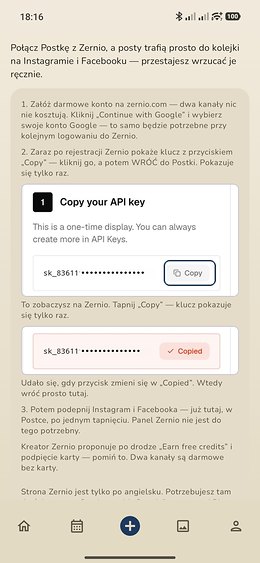
A crop of Zernio's own screen pasted into the instructions: you match a shape instead of reading somebody else's English interface. The key is shown there only once, so this step has to be a picture, not a sentence.
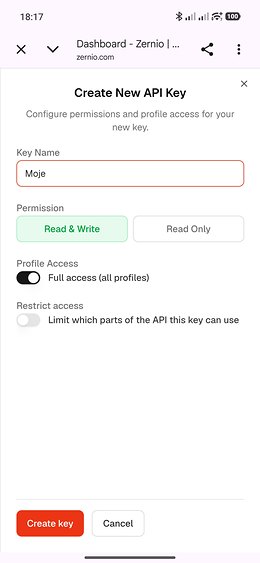
The only moment you leave Postka. Two fields and a button: a name, the Read & Write permission, and you touch nothing else. The panel is English-only, which is why Postka shows it to you as a picture first.
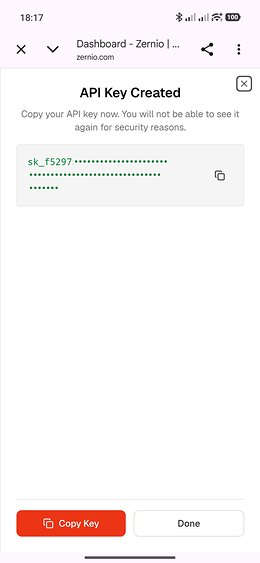
Once, literally: you will not see it a second time, because Zernio does not keep it in readable form. So you tap “Copy” and go back to Postka instead of copying it out by hand.
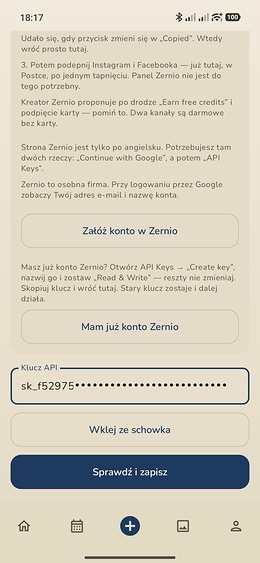
“Paste from clipboard” instead of retyping 64 characters. “Check and save” verifies the key immediately: you do not find out something is wrong from the first post that never went up.
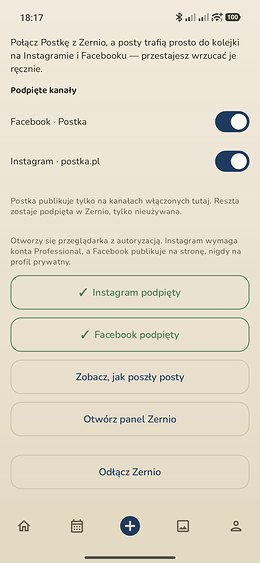
Instagram and Facebook with one tap, without going back to the Zernio panel. Every channel has a switch: Postka publishes only where you turn it on, the rest stay connected, simply unused.
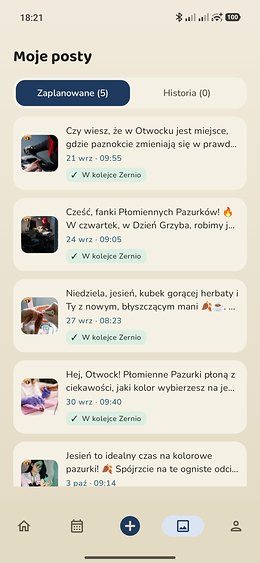
Every scheduled post carries a “✓ In the Zernio queue” badge. And when a publication fails, the post does not quietly disappear. It stays on the list, so you know something went wrong.
You connect an account once, through Zernio, and the scheduled posts go out at the hour you picked. No copying the caption, no saving the graphic to your gallery, nothing to remember on a Tuesday evening.
Zernio's free plan covers two channels of your choice, or just one, if that is all you need. Most people pick Instagram and Facebook, but LinkedIn works just as well instead of Facebook. Instagram and Facebook connect with one button right from Postka; every other platform gets connected in the Zernio panel, and Postka picks it up from there. Already have an account there with channels connected? Paste the key and Postka will see them. Nothing gets connected twice.
The caption stays clean and the hashtags land underneath as the first comment, the way accounts run by someone who knows what they are doing tend to look. Postka splits them itself; you never think about it.
Instagram and Facebook accept different aspect ratios, and Zernio rejects the entire post when even one channel's rules are not met. Postka checks the crop earlier, on its own side, so you do not find out from a post that never went up.
Not a dashboard with forty metrics. Three things that actually change the next batch. All of them measured on your own account, not on an industry average.
“Your posts do best around 6pm, from 24 posts.” Postka takes that hour from your own results and sets it on the next batch by itself. You do not have to do anything with the knowledge.
Warm, matter-of-fact or playful. After a dozen or so posts it becomes clear which one your audience responds to. Postka says it plainly: “the tone that works best for you is…”, and you decide whether to follow it.
Age, gender and city of your followers, plus reactions over the last 30 days and a comparison with the month before. Instagram only reports this above a hundred followers, so early on it will be empty. That is not a fault.
Postka publishes only to the channels you switch on yourself. You can disconnect at any time, but honestly: posts already sitting in Zernio's queue will still go out, because they are on their side by then. You delete those in the Zernio panel.
The key to your Zernio account is kept encrypted on your phone, with a hardware key that cannot be extracted from it. It never reaches our server, never goes into a backup, and does not travel to a new phone.
Posts are written by Bielik, a language model built in Poland by SpeakLeash together with Cyfronet AGH, trained on Polish text on a supercomputer in Kraków. It is not an English model with a translator bolted on.
That matters more than it sounds. Polish inflects proper nouns: a business name and a city name change their ending depending on where they sit in the sentence. Models trained on English leave them in the dictionary form, and to a Polish reader the result is unmistakably machine-written, the way “I work at Google in London” would read as “I work at Google in London-city”.
Postka writes “w Płomiennych Pazurkach w Krakowie”, not “w Płomienne Pazurki w Kraków”. Nobody has to know a machine wrote it, and that is the entire point.
The model runs on infrastructure inside the European Union, so a business's content never leaves the EU.

Ten posts a month at no cost, and if they run out early, you can earn another one by watching an ad.
(roughly €9 a month, billed in PLN)
Every post genuinely costs money. Not “platform maintenance” in scare quotes, but a bill that arrives: a language model has to compute it and a server has to deliver it. It is pennies per post, but pennies times thousands of posts stops being zero, and somebody has to pay it.
That is why the free tier has a limit and ads. Ads are not a punishment, they are the settlement: watching one covers the cost of a post with room to spare, so you can pay with attention instead of money. Premium is the same deal stated plainly: you pay, and you see nothing.
We do not sell your data, and there is no third path where everything is free. We would rather say so outright than pretend electricity is free.

Your shop, your work, the flowers you got in this morning. Nothing beats a photo where customers recognise the place they have been to. Postka takes it straight from the phone's gallery.
No photo of your own? Cannot face taking one? There is a Pexels tab right next to it. Free photos, searched by the topic of the specific post rather than by the name of the trade: a post about spring bouquets gets bouquets, not generic “florist shop” stock. One tap drops it behind the text and nobody will know.

Over fifteen hundred occasions a year: public holidays, name days, odd little observances. But the number is not the point. The point is that a human went through them by hand and assigned them to trades. A florist never gets Brewer's Day, and a plumber never gets Flower Day.

The calendar of occasions is the same for every florist in the country. The calendar on your phone is only yours. And it knows things no general list ever will.
With your permission, Postka reads events from it and treats them as occasions: the anniversary of opening, an open day, a course you are running, a trade fair you are going to, the start of a season, a new collection arriving. They appear in the same list as the holidays, with the same “Generate post” button. Birthdays are recognised separately and marked with a cake.
You choose which calendars it may read: the work one yes, the family one probably not. Reading is one-way: Postka writes nothing and adds nothing to your calendar.

Social media is the last item on that list. Always.

Free slots, transformations, wedding season.

A whole year of run-ups to holidays. Pre-orders, not improvisation.

Order deadlines, seasonal baking, new things.

Plumbers, electricians, mechanics. They have their days too.

Every graphic lands in “My posts” and stays editable. Come back a week later, open it, and the editor restores exactly what was there: every text layer, the font, the colour, the rotation, the photo crop. Change one date and send it again instead of starting over.
Because it is a real editor, not a template filler: multiple text layers, five typefaces, any colour, bold, alignment, a pill behind the text, rotation, photo cropping and twenty steps of undo. You do not set the format: Postka gives you 4:5 for Instagram and 9:16 for Facebook, always exported at 1080 pixels.
And when there is no time to publish right now: “Schedule for later”. Postka sends a notification at the hour you pick, with the finished post waiting inside.
Worth knowing before you install it.
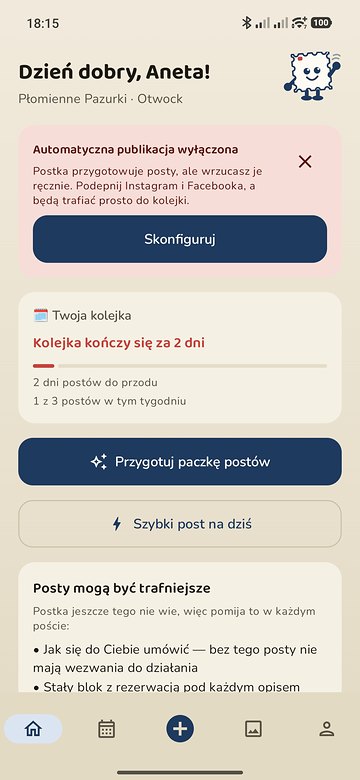
Automatic publishing is your choice, not the default. Until you connect an account, Postka prepares the post and the graphic and you send them yourself, in one share. And once connected, you can switch it off whenever you like and go back to sending by hand.
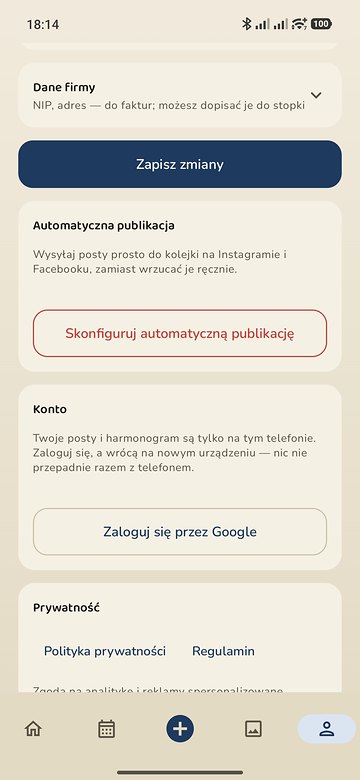
Install it and write: no registration, no password. You can sign in with Google, but only so your posts survive a change of phone. Writing does not need it.
The phone calendar is read only with your permission, read-only, and only from the calendars you point to. Nothing leaves the device from it.
Better said before you install it than after. Some businesses run their profile professionally: a plan for the quarter, a photo shoot, a coherent grid, someone whose job it is. They are already doing it and they will do it better than an app.
Postka is for everyone else. For businesses where nobody is minding it, because the owner is at the chair, at the counter or under somebody's sink. There the alternative to an average post is not a better post, it is none at all.
So Postka does not promise reach or viral content. It promises that next month there will be something on your profile.


One brilliant post changes nothing. Three ordinary ones a week do. That is why the home screen leads with a “Your queue” card. And it does not tell you how many posts you have published. It tells you the thing that matters more: how many days are left in it.
Five days before it runs out, Postka sends one notification: the queue is ending. One, at ten in the morning, never repeated, because a post's hour can be drawn at two in the morning, and this has to arrive when you can actually sit down and build a new batch. Five days rather than one, because a warning you cannot act on in time is a wasted notification.
It is the only notification Postka sends at all. Because there is exactly one way this whole idea really fails: the queue quietly dries up, the profile goes silent, and you are the last to know. The rest of the app can be perfect and it will not change that.

Ten posts a month for free and no account to create. The first run takes a few minutes: business name, town, trade.
For Android 8.0+ and iPhone with iOS 15+. Published in Poland for now.
The first run takes a few minutes: business name, town, trade. After that you sit down once a month for five to ten minutes: look through the suggested occasions, generate a batch of posts, fix whatever you want and drop it into the queue. For the rest of the month you do not have to open the app: with Zernio connected a post goes out every few days on its own. Without it you send them yourself, but the rest of the work is already done.
Not in the sense an agency is professional. Postka will not build you a quarterly strategy, a photo shoot or a coherent Instagram grid. It writes posts that are correct, on topic and regular. The kind that make a profile look tended rather than abandoned.
If you take social media seriously and have the time for it, you will do it better yourself. Postka is for businesses where the alternative is not a better post, it is no post.
Postka writes Polish with a model trained on Polish rather than translating from English, so it inflects your business name and your city correctly, the detail a Polish reader notices first. On top of that it knows your trade, the tone you picked and what makes you different. The post is a starting point, not an oracle: you edit it before publishing, and that takes seconds instead of half an hour.
You do not have to, but it is the way Postka is built to be used. Everything else still works, there is just more of it left for you. The connection goes through Zernio, which talks to Instagram and Facebook over Meta's official API; two channels there are free, for good.
Without it, Postka still writes the caption and builds the graphic, but you handle sending it yourself: save the image to your gallery, copy the caption, open Instagram or Facebook and paste it in by hand, separately for every post. Connect Zernio and that step disappears entirely. The key to your Zernio account stays encrypted on the phone and never reaches our server.
A few minutes, and no card is needed. You create a free account with “Continue with Google” (Zernio is a separate company, so it will see your email address and account name), copy the key Zernio shows only once, and paste it into Postka. There is a “Paste from clipboard” button, so you are not retyping 64 characters. Two channels are free for good.
The Zernio panel is English-only and offers “Earn free credits” and a card along the way. Skip both. Two things worth knowing up front: Instagram needs a Professional account, and Facebook posts to a business Page, never to a private profile.
No Facebook Page? Zernio lets you choose which platforms fill your two free slots: you can connect LinkedIn instead of Facebook, or just keep Instagram and save the other channel for later.
That is the shortest route: open “API Keys”, click “Create key”, leave the permissions on “Read & Write” and paste the key into Postka. Your existing channels and scheduled posts are untouched, and your old key keeps working. A new one invalidates nothing.
If you have more than two channels because you pay Zernio for a larger plan, Postka publishes only to the ones you switch on in the app. The rest stay connected in Zernio, simply unused.
Postka notices and stops showing it as scheduled. Sending a post is not the end of its life. The app keeps checking that its queue still matches what actually stands on Zernio's side. Otherwise you would be left with a list promising posts that no longer exist.
On first run you give your business name, your town and your trade. We filter the calendar of occasions on that basis: a florist gets Mother's Day a week ahead, a car workshop does not get it at all. Optionally you can allow the phone calendar to be read, so your own dates join the list.
Only the ones you point to: the first time you open the calendar you get a list of every calendar on the phone and tick the ones to take events from. Work yes, family you can leave alone. You can change it whenever you like. Reading is one-way: Postka writes nothing and adds nothing to your calendar, and events do not leave the phone until you ask for a post about one.
The text you type goes to our server in the European Union to generate the post. That is all. We do not create an account for you, we do not collect contact lists, we do not sell data. The calendar is read locally on the phone and only from the calendars you choose.
Ideally from your own gallery. A photo of your shop or your work will always beat stock. If you have nothing to hand, the app has the Pexels library built in, with free photos matched to the topic of the specific post. You may use them commercially, including on Instagram and Facebook.
Yes, and there is nothing for you to set. Postka crops it itself: 4:5 for Instagram, 9:16 for Facebook, and the export is always 1080 pixels wide, whatever phone you have.
The aspect-ratio picker was in the app until August and has been removed. 9:16 is a ratio of 0.56 and Instagram accepts 0.75 to 1.91, so a post saved that way simply never went up, and there was no way to work out why. Backgrounds can be your own photos or ones from the built-in library.
Android 8.0 and newer, and iPhone with iOS 15 or newer. You can get it on Google Play or the App Store; both are published in Poland for now.